



Description
Product Overview
The Plustek 1680 ImageExpress flatbed scanner is engineered to meet the demanding needs of both home office users and small business environments. Measuring 16 x 23 x 3 inches and weighing just under 10 pounds, this compact device fits comfortably on any desk while delivering professional‑grade performance. Its high‑speed scanning engine can capture a full‑size tabloid document at 300 dpi in as little as three seconds for grayscale images, and five seconds for color, dramatically reducing the time spent on digitizing large documents. The scanner supports a wide range of file formats, including PDF, JPEG, and TIFF, and integrates seamlessly with popular software suites thanks to its TWAIN and ICA drivers for Windows and macOS. The intuitive interface features four dedicated, pre‑configured buttons that allow users to set destination folders, file types, naming conventions, and other preferences with a single touch, eliminating the need for complex menu navigation. Built with a durable glass platen and a reliable feed mechanism, the 1680 ImageExpress ensures consistent image quality across thousands of scans, making it an ideal solution for archiving, graphic design, and everyday document management.
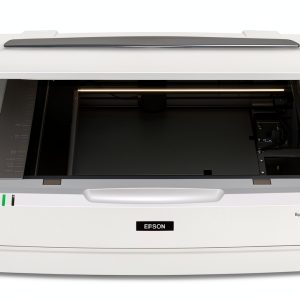
![[Product front view showing all components]](https://www.findareas.store/wp-content/uploads/2026/06/c7511218bdcc446bae8f1ab57d1878f8.jpg)
Usage
Designed for versatility, the 1680 ImageExpress excels in a variety of real‑world scenarios. In a home office, it quickly digitizes family photos, receipts, and legal documents, allowing users to create searchable PDFs and organize files with minimal effort. Small businesses benefit from its ability to scan large marketing materials, contracts, and multi‑page reports, streamlining record‑keeping and improving collaboration across teams. Creative professionals, such as graphic designers and illustrators, appreciate the scanner’s accurate color reproduction and fine detail capture, which are essential for reproducing artwork and preparing high‑resolution prints. The device’s compatibility with both Windows 7/8/10/11 and macOS 10.12 through 15.x ensures that it can be integrated into mixed‑OS environments without additional configuration. Whether placed on a desk, a tabletop, or a dedicated scanning station, the scanner’s low noise operation and ergonomic design make it comfortable to use for extended periods, supporting continuous workflow in busy office settings.
Why Choose Us
Choosing the Plustek 1680 ImageExpress means investing in a product backed by years of expertise in imaging technology. Plustek’s reputation for reliability is reflected in the scanner’s robust construction, which includes a reinforced glass surface that resists scratches and a motor designed for long‑term durability. The scanner’s one‑key operation reduces training time and minimizes user error, delivering consistent results even for non‑technical staff. Comprehensive driver support ensures compatibility with a broad ecosystem of software applications, from document management systems to creative suites, providing flexibility for diverse workflows. Plustek also offers responsive customer support, with access to firmware updates, troubleshooting resources, and a dedicated service team ready to assist with any technical inquiries. This commitment to quality and service gives users confidence that their investment will continue to deliver value well beyond the initial purchase.
Key Features
- Rapid tabloid scanning in seconds, saving time on large‑format documents and boosting productivity.
- One‑key operation with four programmable buttons for instant file destination, type, and naming control.
- High‑resolution 300 dpi output ensures crisp, detailed images suitable for archival and professional use.
- Full compatibility with Windows and macOS platforms via TWAIN and ICA drivers, supporting a wide range of applications.
- Dedicated customer support and regular firmware updates provide peace of mind and long‑term reliability.
FAQ
What document sizes can the scanner handle?
The 1680 ImageExpress accommodates documents up to 11 × 17 inches (tabloid) on its flatbed, allowing you to scan larger photos, brochures, and artwork without needing to crop or resize.
Is the scanner compatible with my operating system?
Yes, the scanner includes TWAIN drivers for Windows 7, 8, 10, and 11, as well as ICA drivers for macOS 10.12 through 15.x. You can download the latest driver versions from Plustek’s website to ensure optimal performance.
How does the one‑key operation improve workflow?
Each of the four dedicated buttons can be pre‑configured to select a specific destination folder, file format, naming convention, and other settings. By pressing a single button, the scanner automatically applies these preferences, eliminating the need to navigate menus and reducing the chance of errors.
Can I scan color documents quickly?
Yes, the scanner captures color documents at 300 dpi in approximately five seconds, providing a fast yet high‑quality result that is ideal for marketing materials, color photographs, and detailed graphics.
What kind of support does Plustek offer after purchase?
Plustek provides a comprehensive support portal with downloadable drivers, firmware updates, user manuals, and troubleshooting guides. Their technical support team is available to assist with any issues, ensuring that you get the most out of your scanner throughout its lifespan.


 Dole Sugar Free Mixed Fruit in Cherry Gel Snack Cups
Reviews
There are no reviews yet.